Your team is logging 40-hour weeks and the project budget is full. But, for some reason, you still find yourself requesting deadline extensions.
Here’s the thing: your spreadsheets and to-do lists are tracking effort, not workflow. They can’t show you that one small, stuck task is about to derail the entire project, or that a key team member is overloaded before becoming a bottleneck.
The lack of predictive data forces you to manage by ‘gut feel,’ leaving you trapped in a constant state of reactive firefighting.
Project managers everywhere commonly face this problem.
The solution is simple: you need to fundamentally shift from managing tasks to analyzing your workflow. Data analytics provides the clarity to turn your team’s work into a predictive map.
Ultimately, it’s how you stop firefighting and start planning with confidence.
The 4-Step Framework for Predictive Project Planning
This 4-step framework is our practical application of data analytics: a reliable, repeatable system that moves you from simply having data to actively using it.
Step 1: Establish a Single Source of Truth for Historical Data
Predictive planning needs a foundation of reliable, centralized data. Your spreadsheets, emails, and generic to-do lists are data silos that are surprisingly effective at preventing data centralization.
Generic project management tools are just digital checklists. Sure, they capture task completion, but not the critical time, resource, and financial data needed for real analysis. And don’t even get us started on conflicting and error-prone manual spreadsheets.
A true single source of truth is an integrated dataset. It must connect four critical data points for every entry: the task itself, the time spent, the person assigned, and the project it belongs to.
Without this clean, structured, and interconnected data, the rest of the framework falls apart.
Step 2: Pinpoint Hidden Bottlenecks with Cycle Time Analysis
Cycle time measures the total time a task spends in your workflow, from the moment work begins to the moment it is finished. It is the most accurate measure of your team’s velocity, tracking their entire journey and including all the “wait time” in between.
Your spreadsheets and to-do lists are blind to this “wait time” metric. They only track if a task is done, not how long it spent sitting idle in a “Client Review” or “Waiting for QA” queue. This idle time is the true source of your timeline overruns, and it is completely invisible in a simple checklist.
Analyzing cycle time exposes these specific, inefficient stages of your workflow. It provides a data-driven map of your process, allowing you to stop guessing where the problem is and start fixing the exact part of your workflow that is broken.
It is critical to distinguish this from lead time, the total duration your customer experiences. A project can have a fast cycle time (your team works efficiently) but a long lead time (your approval queues are slow).
This distinction is how you find the real problem. By exposing the specific, inefficient “wait” stages in your workflow, you can stop guessing and start fixing the exact part of your process that is broken.
Step 3: Improve Future Estimates with Performance Analytics
When managers rely solely on memory, they tend to create inaccurate estimates. Unfortunately, this gut feel method leads to the under-quoted and over-budget project issues we’re trying to avoid.
Our objective is to replace this guesswork with data-driven estimation. In performance analytics, we’ll use the historical data you collected to build a library of your team’s actual performance, creating a predictable foundation for project timelines.
Building this foundation requires integrating specific, repeatable techniques into your planning process:
- Break projects into granular tasks. Tasks with general and vague titles like “Build Website” typically fail. Instead, you want to break this project into specific components like “Wireframe Homepage” and “Develop Contact Form” to create a more precise bottom-up estimation.
- Use analogous estimation. Base new estimates on the actual completion times from your historical data on similar, archived projects. Remember to adjust for any known differences in scope or complexity.
- Apply parametric estimation for repeat tasks. For standardized work, calculate a statistical average, such as time per task or cost per function point. This is highly accurate for high-volume, repeatable processes.
- Implement three-point estimation. Account for uncertainty by getting three estimates for critical tasks: Optimistic (best-case), Pessimistic (worst-case), and Most Likely. Use a weighted average of these three to create a final estimate that reflects risk, and minimizes optimism.
Step 4: Proactively Balance Workloads with Capacity Analytics
Your timeline is only as strong as its most overloaded team me mber. That single, inevitable bottleneck often leads to a cascade of delays and costly mistakes. A simple to-do list could show a task is ‘assigned,’ but it has no concept of that person’s total workload or their actual bandwidth.
The answer? Capacity analytics.
Capacity analytics is tracking the total assigned workload against each person’s available hours and it relies entirely on a complete, centralized dataset. The result is a real-time map of your team’s utilization, allowing you to spot overload risks before they happen.
Data is Just Noise Without the Right System
This 4-step framework is your path to clarity. However, these steps are useless if they are disconnected.
A truly effective system must connect all four steps.
This is what PlanArty’s system was designed to do.
- PlanArty’s centralized time tracking is the engine for the entire framework. It requires every tracked minute to be tied to a specific project, task, and client. This creates the clean, reliable, multi-layered historical dataset that makes all other analysis possible.
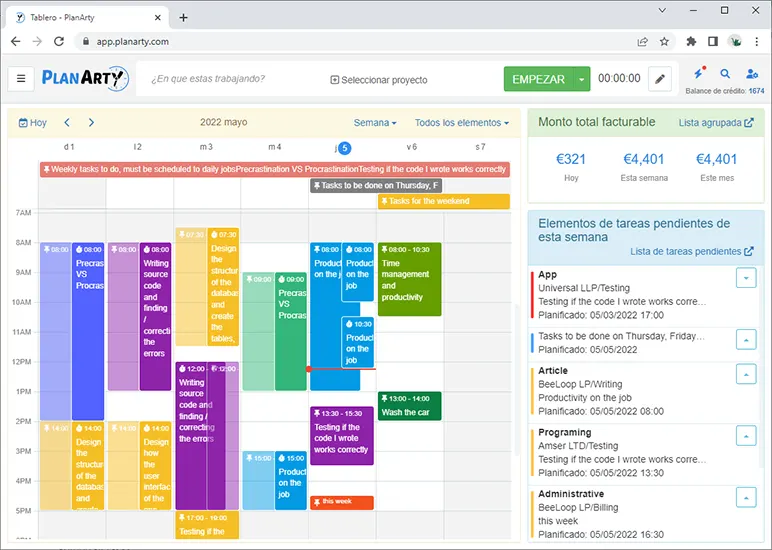
- PlanArty’s detailed reports are your tools for analytics. They process your data to show you exactly how long tasks and projects take. They allow you to spot bottlenecks and provide you the performance data you need to build accurate, defensible estimates.
- The Team Capacity Overview is the predictive solution. Because all time and tasks are in one system, it provides a real-time visual of your team’s entire workload. You can see who is overloaded and who has bandwidth before they become a bottleneck.
This system provides the actionable dashboards you need without requiring you to become a data scientist. While professionals from top data analytics master’s programs are trained to build complex models from raw, chaotic data, PlanArty is designed to do a lot of the heavy lifting for you. It curates the most critical insights such as bottlenecks, capacity, and performance, and allows you to make data-driven decisions yourself, directly from the overview.
Stop Firefighting. Start Planning.
Managing projects by gut feel is a liability that actively drains your profitability. For many teams, it is the direct cause of budget overruns, missed deadlines, and burnt-out members.
The 4-step data analytics framework is the system that replaces this chaos.
And the benefits speak for themselves.
Following this framework delivers defensible estimates, letting you easily price projects for profit.
It provides real-time workload clarity, preventing team burnout before it starts.
Most importantly, it builds predictable timelines, so you can stop firefighting and finally deliver on your critical promises.
This is how you move from analysis to action.
Need to See Your Team’s Real Capacity?
Start your free, no-risk trial and get the hard data you need to build accurate estimates and predictable project timelines.