The Team Occupancy System
Technical Blueprint
Knowing who is busy is easy. Knowing exactly when they will run out of work is precision. PlanArty turns project tasks into a live forecast of your team’s capacity.
This guide provides a detailed look at the simple steps and the logic that make this clarity possible.
- No credit card required
- Join other service businesses who trust PlanArty
The 4 Dimensions of Team Capacity
Most tools manage tasks. PlanArty manages “Runway”—the actual days/hours of productivity left for every specialist on your team.
State
Urgency Level
The immediate “Traffic Light” diagnostic. Tells you instantly who needs attention now (0-1 days left) and who is set for the week.
Backlog
The Runway (Days)
The core metric: Remaining Hours / Daily Capacity. It tells you exactly how many days of “quiet” you have before a person idles.
Allocation
Volume (Hours)
The raw depth of the workload. Vital for balancing the load between senior experts and junior team members.
Resilience
Focus (Safety)
Ensures every member has a “backup” task. If they get stuck, they pivot to the next actionable item without losing billable time.
The 5-Step Capacity Procedure
This procedure ensures that your growth is limited only by your sales, not by your lack of visibility into your own team.
1
Define Individual Daily Capacity
Precision starts with knowing the engine’s power.
PM Action:
Set the “Daily Capacity” for each team member (e.g., 6h, 7h, or 8h).
The Result:
The system now has a denominator for its equations. It knows how much “work-time” is available per day.
2
The “Expert Estimate” Feed
Estimation is the first act of accountability; the person doing the work defines the timeline.
Logic:
Every task assigned and estimated in the PM module automatically flows into the Occupancy calculations.
The Result:
The “Remaining Allocated” column updates in real-time. By owning the estimate, the colleague takes responsibility for the delivery.
3
Enforce the “Backlog Barrier”
Only work that is ready to start counts toward a colleague’s future availability.
Safety Logic:
The “Can Be Started” toggle acts as a precision filter. If a task is assigned but blocked by a prerequisite, it stays out of the Occupancy calculation.
The Result:
You avoid the “False Security” of a long backlog. You see exactly when a team member will really run out of things they can actually work on.
4
Real-Time Capacity Drain
As the timer runs, the future visibility adjusts.
Automatic Sync:
Every second recorded by a team member reduces the “Remaining Hours” of that task.
The Result:
Your Occupancy Dashboard is a living organism. If a task takes longer than expected, the person’s runway grows automatically.
5
Strategic Rebalancing
Turn daily habits into high-level business intelligence.
Insight:
The system flags “Urgent” (red) when a person has less than 1 day of work left.
The Action:
You rebalance work or assign the next project before the idle time happens.
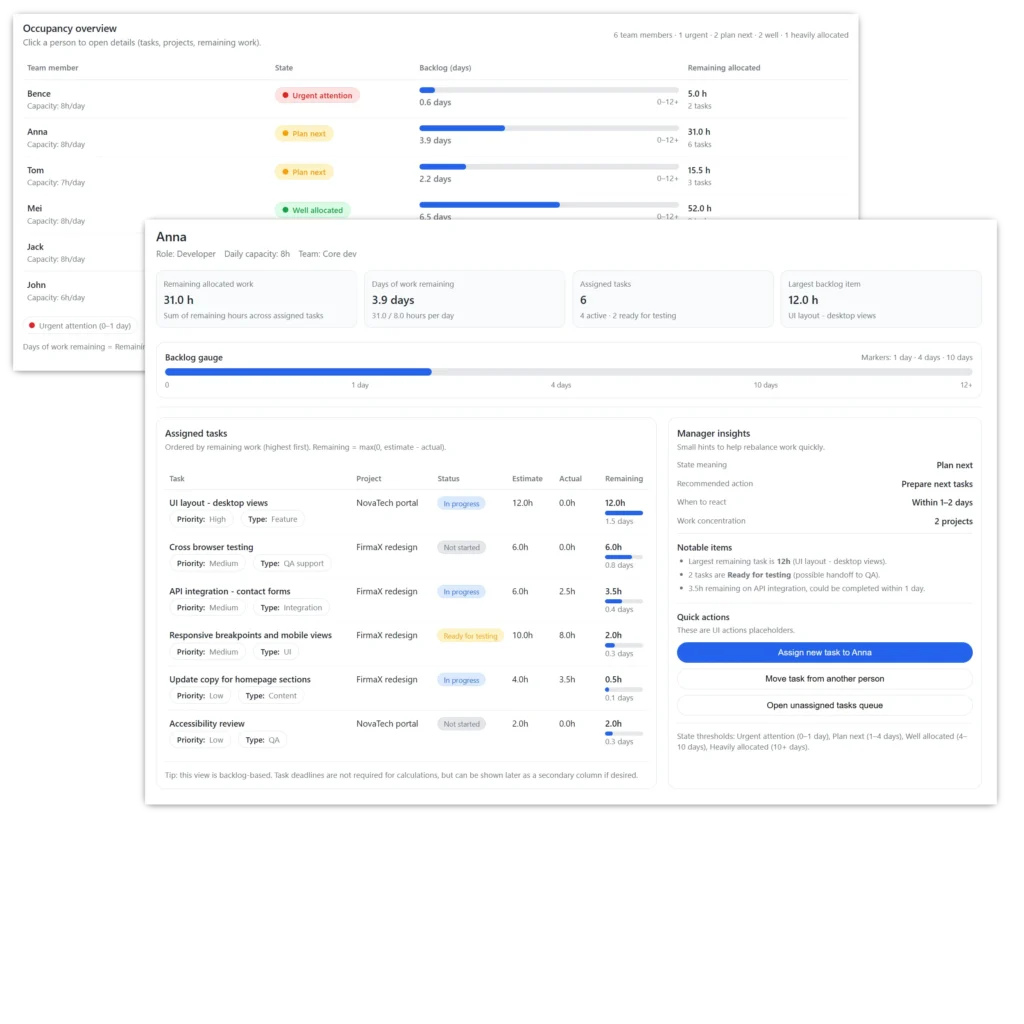
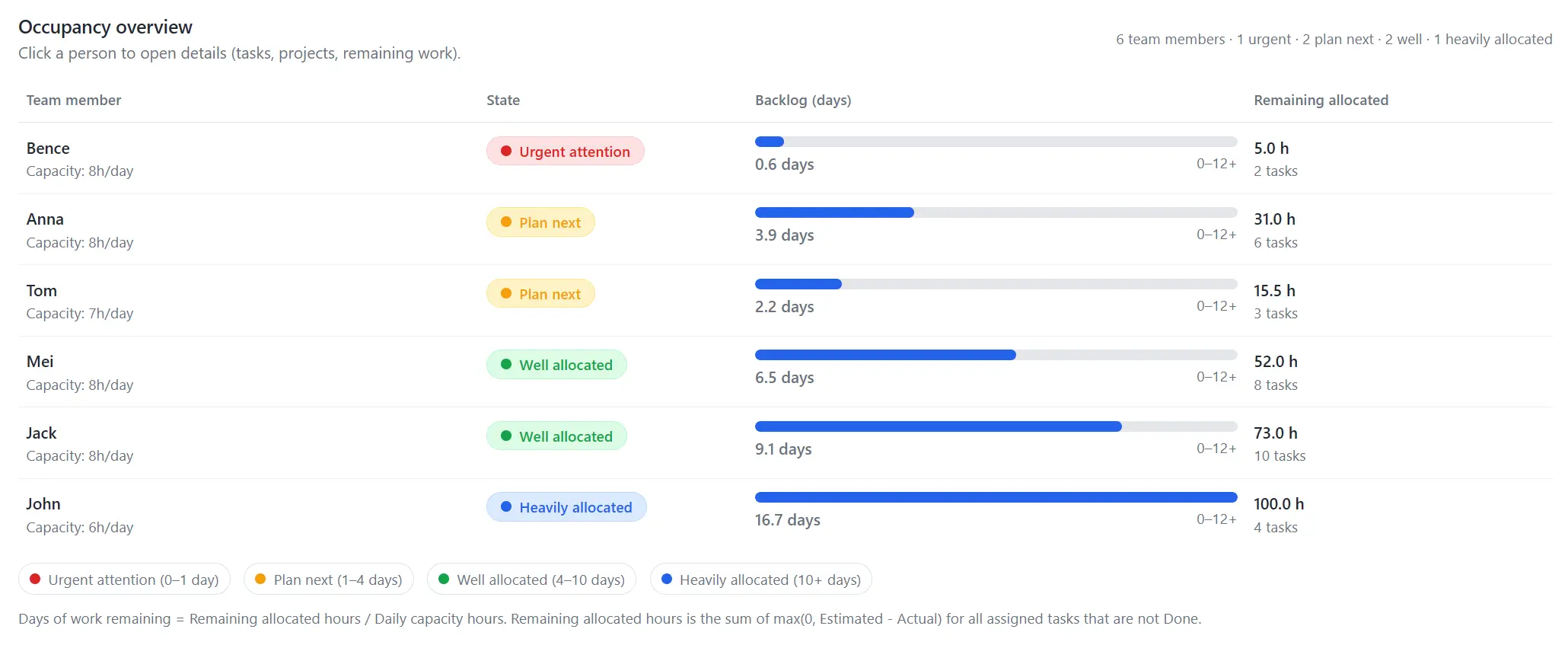
The Team Capacity Diagnostic
A single-screen overview of your entire department’s health. It takes every live project, every specialist’s capacity, and every expert estimate to show you the “Runway” for each team member.
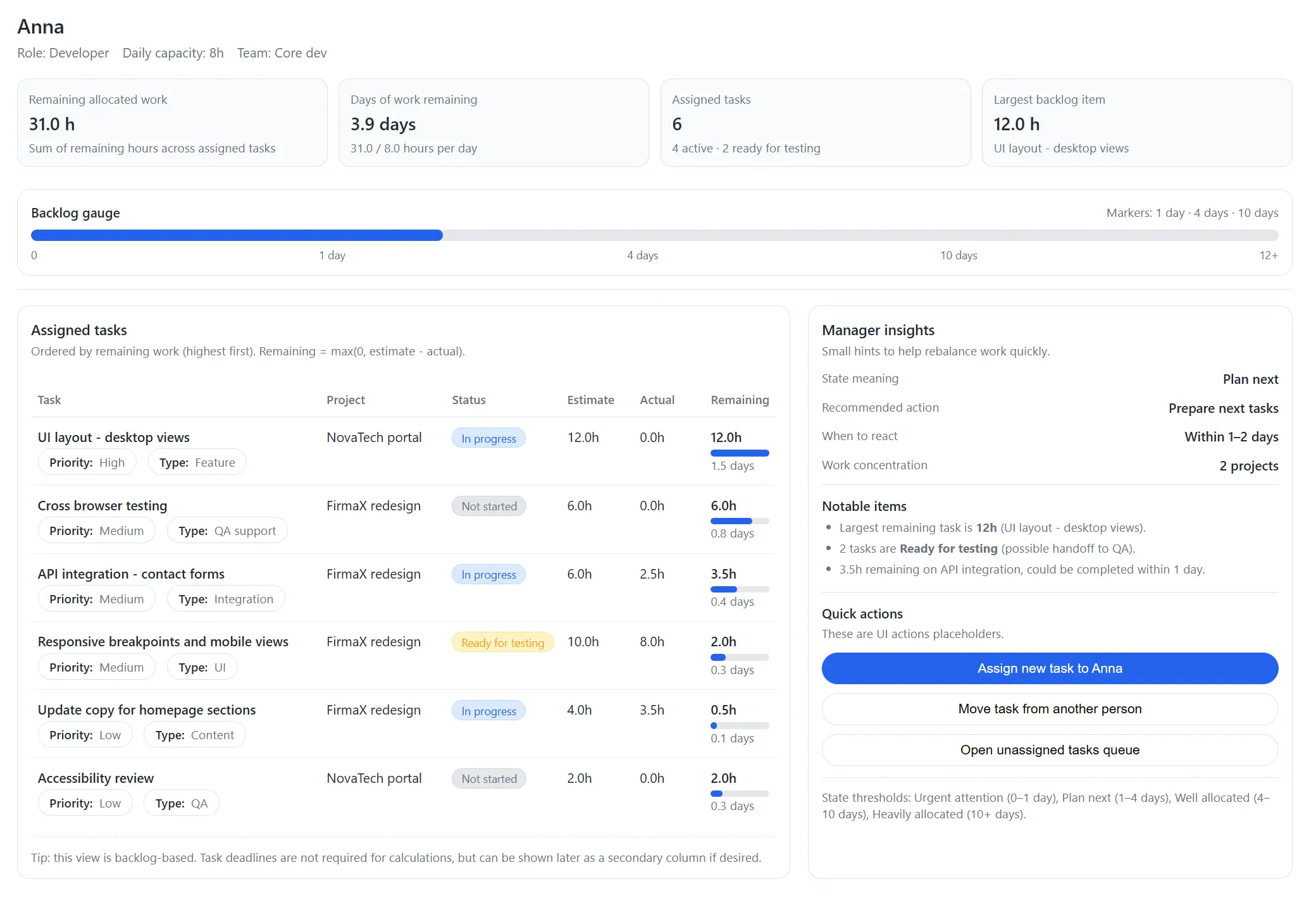
The Specialist Drill-Down
When you click a person, you go surgical. This view shows you exactly why a person is “Plan Next” or “Urgent,” with calculated insights that tell you how to rebalance work immediately.
Growth is impossible if you are blind to your capacity.
PlanArty transforms team management from “monitoring people” to “protecting momentum.” You have the truth about your team’s availability any time you need it, allowing you to take on new projects with absolute confidence.